Elevate Your Instagram Strategy with Fashion Shop Instagram Carousel
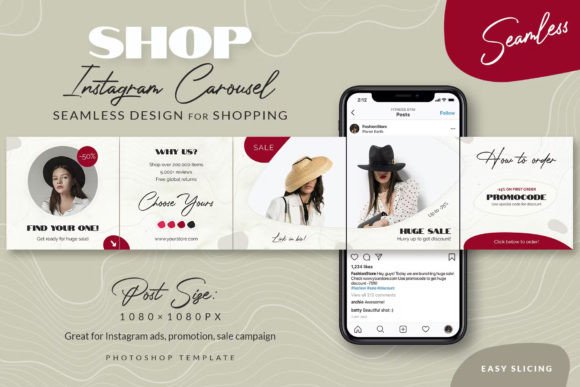
Capturing attention in a crowded digital space requires more than just good photography; it demands a cohesive visual narrative. For fashion entrepreneurs and digital creators, the Fashion Shop Instagram Carousel offers a streamlined solution to present products with elegance and flair. This isn't simply a collection of images; it's a curated, seamless gallery designed to guide your audience through a story, lookbook, or promotional campaign with a single, satisfying swipe.
A Seamless Design for a Cohesive Brand Story
The core appeal of this template lies in its seamless design. Each of the five 1080×1080 pixel posts is meticulously crafted to flow into the next, creating a unified visual experience. When viewed in a user's feed, the carousel presents a continuous image. When swiped, it reveals interconnected content that feels intentional and polished. This approach leverages modern social media graphics trends, where the puzzle effect on a profile grid becomes an engaging visual hook. The design personality strikes a balance—it's cute and approachable without sacrificing professionalism, making it versatile for a wide range of fashion niches, from streetwear boutiques to handmade accessory shops.
Practically, this template functions as a powerful design asset. It eliminates the guesswork in layout and composition. The pre-prepared slices ensure that exporting for Instagram is flawless, preserving the seamless alignment. For a small business owner, this means less time wrestling with complex design software and more time focusing on product and customer engagement. The included free font links and simple instructions further lower the barrier to entry, allowing even those with basic Photoshop skills to achieve a high-end result.
Strategic Applications Beyond the Single Post
Understanding where to deploy the Fashion Shop Instagram Carousel is key to maximizing its value. Its primary function is for Instagram Shop promotion, where you can showcase multiple product angles, color variations, or styled outfits within one post. However, its utility extends far beyond a simple product display.
Consider using the carousel for a promo campaign. Each slide can represent a different offer, a countdown to a sale, or a highlight of customer testimonials. It's essentially 5 ads in one Instagram post, allowing you to communicate a multifaceted message without cluttering your profile grid with separate announcements. For content creators and bloggers, it's an excellent tool for sharing a step-by-step tutorial, a travel diary, or a behind-the-scenes look at a photoshoot, maintaining narrative flow.
The template also influences brand identity and perception. A consistent, high-quality visual style across your carousel posts builds recognition and trust. The clean, modern aesthetic supports a professional image, which is crucial for converting followers into customers. When your audience knows they can expect beautifully designed, informative content, they are more likely to engage with every slide, boosting your post's performance in the algorithm.
Practical Guidance for Implementation and Customization
While the template is designed for ease of use, thoughtful customization will yield the best results. Here’s how to approach it:
- Evaluate Your Content Fit: Before editing, outline the story or message for your five slides. Do you need a clear call-to-action on the final slide? Will the images you have maintain visual harmony when placed side-by-side? Planning the content first ensures the design serves the message.
- Master the Edit: The PSD files are fully editable. Focus on replacing the placeholder photos with your own high-quality images. Adjust the text to reflect your brand's voice and current promotion. The pre-set font pairing works well, but ensure your chosen typeface remains legible against your photo backgrounds—readability is paramount.
- Test the Flow: After editing, use Photoshop's "Save for Web" or export function to generate the five separate images. Upload them to Instagram's carousel feature and preview the swipe-through. Check that elements align perfectly at the seams. This step is non-negotiable for maintaining the professional, seamless effect.
- Think About Grid Aesthetics: Remember that the first image will be the thumbnail on your profile grid. Ensure it is compelling enough to stand alone while still being intriguing enough to encourage a swipe. The "puzzle effect" is a bonus; your primary goal is that each individual post is strong.
This template is more than a shortcut; it's a framework for consistent, high-quality social media graphics. By providing a structured yet flexible design, it empowers entrepreneurs and creators to execute sophisticated marketing strategies typically reserved for brands with larger budgets and design teams. The result is a more engaging, professional, and effective Instagram presence that can attract customers and build a loyal community.