Gold Text Effect Luxury Style Theme: Instant Elegance
Understanding This Premium Design Asset
In the fast-paced world of digital design, speed and quality are often at odds. You might have a brilliant concept for a high-end logo or a social media campaign, but the execution—specifically creating that polished, metallic look—can take hours of layering and shading. The Gold Text Effect Luxury Style Theme solves this problem by acting as a pre-built bridge between your raw ideas and a professional finish. It is crucial to understand that this is not a font or typeface you install in your system folder. Instead, it functions as a specialized display font treatment designed specifically for Adobe Illustrator users. It leverages the software's Graphic Styles panel to instantly apply complex, high-fidelity gold textures to any text you create.
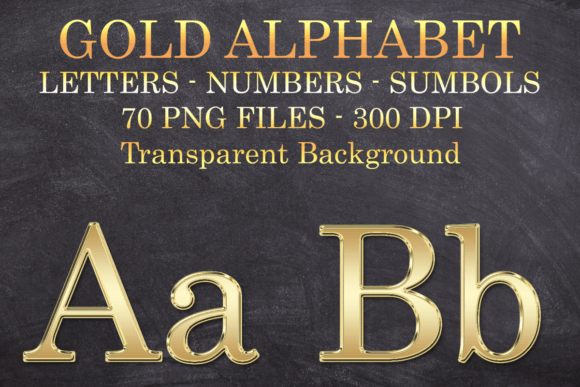
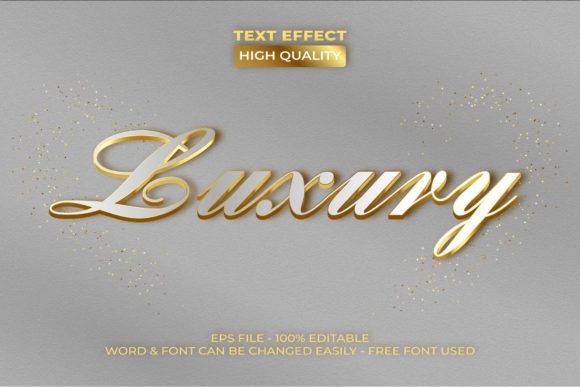
Visually, this asset commands attention. It mimics the depth and luster of real metallic gold, featuring realistic gradients, bevels, and shadowing that give your typography a 3D presence. Unlike a flat yellow color swatch, this premium font effect interacts with light, creating a sense of weight and luxury. It bridges the gap between modern typography and decorative art, offering a finish that feels expensive and deliberate. Whether you are working on brand identity for a jewelry line or a header for a web design mockup, the visual personality of this effect is one of opulence, confidence, and authority. It transforms standard vector letters into standout design elements that look like they belong on a movie poster or a high-end product label.
Strategic Applications Across Creative Projects
The versatility of the Gold Text Effect Luxury Style Theme makes it a valuable addition to various creative workflows. Because it is delivered as .eps and .AI files compatible with Adobe Illustrator CC and above, it integrates seamlessly into professional environments. One of the most common applications is in logo design. For brands in the beauty, finance, or hospitality sectors, a gold standard signals prestige. Applying this effect to a wordmark can instantly elevate a startup's visual identity, making it appear established and trustworthy. It removes the guesswork of creating metallic gradients from scratch, ensuring that the final output is consistent and professional.
Beyond logos, this tool is indispensable for packaging design. Imagine a coffee bag, a candle label, or a luxury soap wrapper. The tactile quality of a gold foil stamp is hard to replicate digitally, but this effect comes close. It allows you to present realistic mockups to clients, showing exactly how their branding will look on the shelf. For editorial design, such as magazine covers or book titles, the effect adds a layer of sophistication that draws the reader's eye. It works exceptionally well for drop caps or pull quotes where you want to highlight specific text. Even in the digital realm, such as social media graphics, a touch of gold can stop a user from scrolling. It is particularly effective for announcements, holiday sales, or celebratory posts where the tone is festive and exclusive.
Enhancing Visual Hierarchy and Brand Perception
Typography is a silent ambassador for your brand, and the finish you choose speaks volumes about your values. Using a creative font effect like this one directly influences how your audience perceives your message. Gold has long been associated with success, achievement, and high value. By incorporating the Gold Text Effect Luxury Style Theme, you are subconsciously cueing your audience that the content is important and high-quality. This psychological trigger is vital in marketing materials where you need to establish authority quickly.
However, readability must remain a priority. While this effect is stunning, it functions best as a display font treatment. It is perfect for headlines, short slogans, and branding elements, but it should rarely be used for body copy. The complexity of the gold texture can make small text difficult to read, potentially hurting the user experience. A good font pairing strategy is essential here. To let the gold effect shine, pair it with a clean, neutral sans serif font or a classic serif font for the supporting text. This contrast ensures that your design has a clear visual hierarchy. The gold captures the emotion, while the supporting text delivers the information clearly.
Practical Guide to Usage and Customization
Getting started with this asset is straightforward, provided you understand the basics of Adobe Illustrator. The core functionality relies on the "Graphic Styles" panel. Once you open the provided file, you will see the pre-saved style in this panel. The workflow is simple: select your typeface, type your word, and then click the style. The effect instantly maps to your letterforms. Because this is a vector-based effect, it scales infinitely without losing quality, making it suitable for everything from a small business card to a large-format banner.
When evaluating if this asset fits your project, consider the tone. If you are designing for a corporate law firm or a medical provider, the overt luxury of gold might feel out of place. It is best suited for industries where prestige and aesthetics are key selling points, such as fashion, event planning, or high-end services. Before finalizing your design, always test the font pairing. Try placing your gold text against dark backgrounds—deep navy, black, or charcoal—to maximize the contrast and make the "metal" pop. While the effect is pre-made, you can still tweak the underlying gradient meshes if you are an advanced user, perhaps shifting the hue to rose gold or platinum to match a specific brand identity. Ultimately, this design asset serves as a powerful shortcut, allowing entrepreneurs and designers to produce high-end visual content without the steep learning curve of manual 3D rendering.