Gold Text Effects: Instant Luxury for Your Designs
There's a specific kind of visual impact that stops a viewer in their tracks. It's the look of polished, gleaming gold against a dark, textured background. It immediately communicates value, prestige, and a touch of classic elegance. For designers, marketers, and creators, achieving this high-end metallic effect traditionally required advanced Photoshop skills and a significant time investment. The Gold Text Effects resource changes that, offering a direct path to sophisticated, luxury-style presentations for your text, logos, and shapes.
More Than Just a Filter: Understanding the Visual Appeal
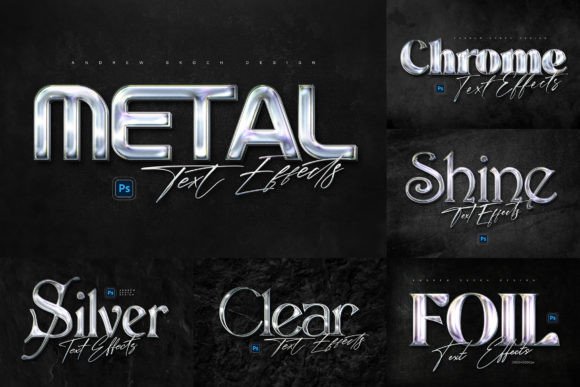
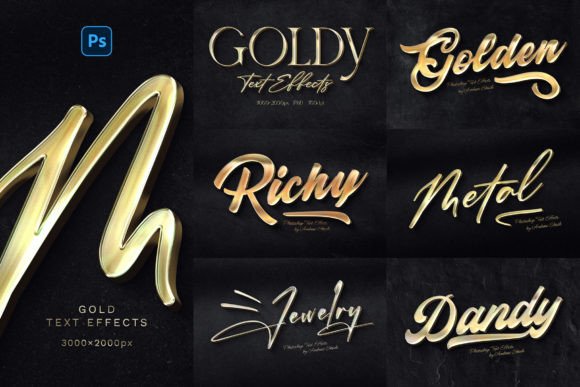
At its core, this isn't a single font file. It's a collection of professional-grade Photoshop templates designed to apply realistic gold metal effects to your work. The visual style is unmistakable: rich, shining gold with intricate highlights and shadows that mimic the look of actual gilded lettering. The accompanying long shadows add depth and a sense of drama, making your text appear as if it's physically raised from the dark, textured wall behind it. This combination creates a powerful aesthetic that feels both luxurious and substantial, perfect for projects that demand attention and convey a sense of premium quality.
The personality of these effects leans into classic opulence but with a modern, clean execution. It avoids the cheap, overly digital look of basic filter effects. Instead, it offers a refined, tangible quality that works across a surprisingly wide range of applications. Whether you're crafting a cinematic title sequence, designing a logo for a high-end brand, or creating a standout social media graphic, the gold effect serves as a versatile tool for brand identity and visual storytelling.
Where Gold Text Effects Shine: Practical Applications
The true value of any design asset is measured by its utility. This is where the Gold Text Effects package proves its worth for a diverse audience. Its flexibility is a key strength, working seamlessly with text layers, vector shapes, pixel layers, smart objects, and folder groups. This means you're not limited to just typing out words; you can apply the effect to your custom logo, an icon, or any other design element.
- Branding & Logo Design: For entrepreneurs and small business owners, a logo needs to be memorable. Applying a gold effect can instantly position a brand in the luxury, boutique, or premium market. Think business cards, letterheads, and website headers that communicate sophistication.
- Marketing & Social Media: In the crowded digital space of Facebook covers, YouTube banners, and Instagram posts, visual hierarchy is everything. A gold text effect can make your call-to-action, headline, or promotional offer the undeniable focal point, increasing engagement and recognition.
- Publishing & Editorial Design: Bloggers and content creators can use these effects for eye-catching featured images, chapter headings in a digital magazine, or title treatments for e-books. It adds a layer of professionalism and polish that elevates the perceived value of the content.
- Personal & Creative Projects: For crafters and hobbyists, the applications are endless. Create stunning party invitations, elegant wedding stationery, custom artwork for your home, or unique gift tags that look professionally made.
Working Smart: How to Use and Customize the Effects
The developers of this resource have prioritized ease of use, which is a massive time-saver. The process is straightforward: you open the PSD file, locate the designated smart object, double-click to open it, and place your own design inside. Save, and the gold effect is automatically and realistically applied to your work. The included help file, with links to the free fonts used in the previews and video instructions, ensures you're never left guessing.
While the effect is impressive out of the box, the well-organized layers and 100% editable nature of the files allow for deeper customization. You can tweak the shadow intensity, adjust the gold's hue, or modify the background texture to perfectly match your project's color scheme. This level of control is crucial for maintaining brand consistency and ensuring the effect complements, rather than overwhelms, your overall design.
When considering this asset, think about your project's specific needs. Is the goal to convey timeless luxury or modern prestige? The dark background and strong shadows make it ideal for high-contrast designs, but it can be adapted. Test the effect with your specific logo or typography to see how the curves and details of your letterforms interact with the metallic finish. The package includes 6 distinct PSD templates, each at a high resolution of 3000×2000 pixels at 300 DPI, making them suitable for both large-format print and detailed digital work. This isn't just a creative font effect; it's a complete design asset for building a cohesive and upscale visual language.
In a landscape saturated with flat design and minimalism, a touch of well-executed gold can be a powerful differentiator. The Gold Text Effects provide an accessible, professional-grade solution for anyone looking to add that instant layer of luxury and refinement to their creative projects, without requiring hours of manual work in Photoshop.